🦞 4minAI.com
1 / 12
Day 10 of 28 Β· AI Challenge

Building a Content Calendar

The biggest reason people stop posting content isn't lack of ideas. It's lack of a plan. They wake up Monday morning thinking "What should I post today?" β€” and by Tuesday, they've posted nothing.

Today you're going to fix that. You'll use AI to build a full month of content in one sitting. No more scrambling. No more guilt. Just a calendar you execute.

Content pillars first

Before you plan what to post, you need to know what you talk about. These are your content pillars β€” 3-5 core themes that everything you create falls under.

A freelance web designer might have:

- Web design tips β€” educating potential clients

- Client results β€” social proof and case studies

- Behind the scenes β€” process, tools, daily life

- Industry opinions β€” hot takes that spark conversation

A personal trainer might have:

- Workout tips β€” quick actionable fitness content

- Nutrition β€” meal prep, recipes, myth-busting

- Client transformations β€” before/after, testimonials

- Mindset β€” motivation, habits, consistency

Content pillars keep you focused. They prevent you from posting random thoughts one day and business tips the next with no thread connecting them. And they make AI's job much easier because you're giving it lanes to work in.

Knowledge Check
Why are content pillars important for AI-assisted content planning?
A
AI can only write about 3-5 topics
B
Social media algorithms require them
C
They give AI clear themes to work within, producing more focused and consistent content
D
They're not important β€” you should post about whatever feels right
When you tell AI "generate 20 post ideas," you get scattered results. When you say "generate 5 post ideas for each of my 4 content pillars," you get organized, strategic content that builds a coherent brand. Pillars turn chaos into a system.

Building the calendar

Here's the exact process. It takes about 20 minutes:

Step 1: Define your pillars (you just did this).

Step 2: Decide your posting frequency. 3x/week is a great starting point. That's 12 posts per month β€” totally manageable.

Step 3: Ask AI to generate topic ideas for each pillar.

Step 4: Map topics to dates, alternating pillars so your feed stays varied.

Step 5: For each topic, generate the actual post (use the framework from Day 8).

Let's build one right now.
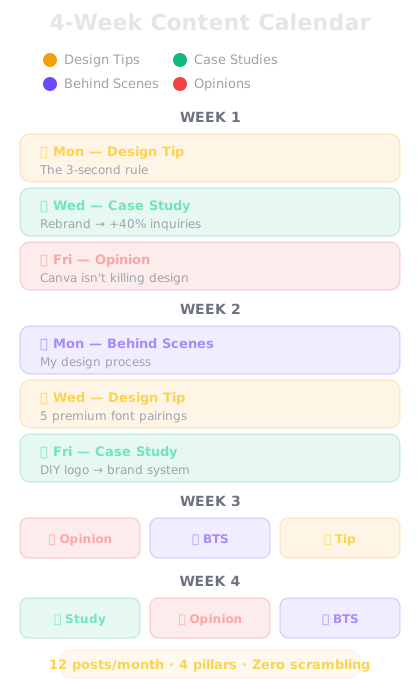
A 4-week content calendar grid with color-coded content pillars
A month of content mapped out in advance β€” alternating pillars keep your feed varied and strategic.
πŸ€–
AI Assistant
online
I'm a freelance brand designer posting on LinkedIn 3x per week. My content pillars are: (1) Design tips and education, (2) Client results and case studies, (3) Behind-the-scenes process, (4) Industry opinions. Build me a 4-week content calendar with specific post topics. Alternate pillars so the feed stays varied.
Here's your 4-week LinkedIn content calendar: **WEEK 1** Mon β€” 🎨 Design tip: "The 3-second rule: why your logo needs to work at 16px" Wed β€” πŸ“Š Client result: "How a rebrand helped [client type] increase inquiries by 40%" Fri β€” πŸ”₯ Opinion: "Canva isn't killing designers. Bad designers are killing designers." **WEEK 2** Mon β€” 🎬 Behind the scenes: "My actual design process from brief to final delivery" Wed β€” 🎨 Design tip: "5 font pairings that make any brand look premium" Fri β€” πŸ“Š Client result: "Before/after: turning a DIY logo into a brand system" **WEEK 3** Mon β€” πŸ”₯ Opinion: "Stop designing for awards. Start designing for revenue." Wed β€” 🎬 Behind the scenes: "Tools I use daily (and the one I just dropped)" Fri β€” 🎨 Design tip: "Color psychology: why your competitor chose blue" **WEEK 4** Mon β€” πŸ“Š Client result: "A $3,500 brand package that helped a startup raise $200K" Wed β€” πŸ”₯ Opinion: "The biggest branding mistake I see small businesses make" Fri β€” 🎬 Behind the scenes: "What a $5K brand project actually includes" That's 12 posts, all pillars represented, zero repetition. Want me to write any of these posts in full?
↻ Replay conversation
Knowledge Check
What's the recommended approach for distributing content pillars across a calendar?
A
Only post about one pillar until you run out of ideas
B
Post all design tips in week 1, all case studies in week 2, etc.
C
Let AI randomly assign pillars to dates
D
Alternate pillars across the week so your feed stays varied and interesting
Alternating pillars keeps your feed interesting for followers. If you post five design tips in a row, people who follow you for opinions or case studies will tune out. Variety within your pillar system keeps different segments of your audience engaged throughout the month.

Batching content in one session

Here's the real productivity unlock. Once you have your calendar, batch-produce the content.

Sit down for 60-90 minutes. Walk through each topic on the calendar. For each one, give AI the prompt using the framework from Day 8 (topic, angle, hook, body, CTA). Edit each post. Save them all.

Now you have a month of content done in one afternoon. The rest of the month, you just publish what's already written. Five minutes a day, max.

People who batch their content report saving 6-8 hours per month compared to creating posts day-by-day. And their content is more consistent because it was all planned together with a clear strategy.

πŸ€–
AI Assistant
online
Let's write the first post from the calendar: "The 3-second rule: why your logo needs to work at 16px." LinkedIn post, educational tone, end with a question to drive comments.
Here's your post: Your logo will be seen at 16 pixels tall. Not on a billboard. Not on a business card. On a browser tab. A social media avatar. A mobile notification. If it doesn't work at that size, it doesn't work. This is the 3-second rule of logo design: β†’ Can someone recognize it in 3 seconds? β†’ At the smallest size it'll ever appear? β†’ Without reading the text? The best logos in the world pass this test. Apple. Nike. Target. They're not detailed illustrations β€” they're simple, distinct shapes. Next time you're reviewing a logo (yours or a client's), shrink it to 16x16 pixels. If it turns into a blob, it needs work. What's a brand whose logo you'd recognize at any size? πŸ‘‡
↻ Replay conversation

Keeping the calendar alive

A calendar is only useful if you actually follow it. Here are three rules that keep it from becoming another abandoned spreadsheet:

1. Build in flexibility. If something timely happens in your industry, swap out a planned post. The calendar is a guide, not a prison.

2. Review weekly, not daily. Every Sunday, spend 10 minutes looking at what's coming up. Adjust if needed. That weekly review takes less time than daily scrambling.

3. Refresh monthly. At the end of each month, look at what performed best. Ask AI to generate next month's calendar weighted toward your top-performing pillar and post types.

The goal isn't perfection. It's consistency. A good-enough post published on schedule beats a perfect post that never gets written.

Final Check
What's the biggest time-saving benefit of batching content with AI?
A
You create a full month of content in one sitting instead of scrambling daily
B
AI writes perfect posts that need no editing
C
You can post 10 times per day
D
Batching improves your writing skills faster
Batching eliminates the daily "what should I post?" problem. One focused session with AI produces a month of strategic, pillar-based content. The rest of the month, you just publish and engage β€” spending 5 minutes a day instead of 45.
πŸ“…
Day 10 Complete
"A content calendar isn't about being rigid β€” it's about never staring at a blank screen again. Pillars, plan, batch, publish."
Tomorrow β€” Day 11
SEO and Keywords with AI
Tomorrow you'll learn to get found online β€” using AI to crack the SEO code.
πŸ”₯1
1 day streak!