Your Hiring Pipeline
You have just completed the most hands-on week of this course. Over the past seven days, you built every piece of an AI-powered engagement and assessment pipeline — from the first outreach message to the final hiring recommendation.
Today we are going to step back, see how all the pieces connect, and make sure your pipeline is ready for real-world use. This is not about learning something new. It is about locking in what you have built so it actually sticks.
The engagement system you built
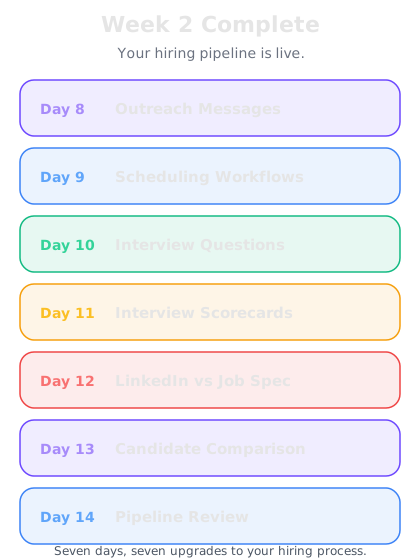
Here is what your Week 2 toolkit looks like, stage by stage:
Day 8 — Outreach — Personalized InMails and cold emails using the four-part framework: personal hook, relevant opportunity, clear value prop, easy next step. Four prompt templates for passive candidates, executives, tech talent, and career changers.
Day 9 — Scheduling — Structured availability collection that replaces the back-and-forth. AI-written scheduling messages for screens, panels, timezone handling, and rescheduling. Booking page descriptions that reduce no-shows.
Day 10 — Interview Questions — Role-specific questions generated from the JD. Competency-based, culture-fit, technical, and situational frameworks. Interviewer briefs that prepare hiring managers in five minutes.
Day 11 — Scorecards — Structured evaluation rubrics with 1-5 scales and anchored descriptions. Templates for technical, behavioral, and leadership interviews. Consistent scoring that reduces bias and creates comparable data.
Day 12 — LinkedIn vs Job Spec — The reusable fit-analysis prompt that compares any profile against any JD. Fit scores, matching skills, gaps, interview talking points, and recommendations — all in one output.
Day 13 — Candidate Comparison — Side-by-side comparison tables, strengths-and-gaps analyses, hiring recommendation memos, and tailored reference check questions.
Each piece is powerful on its own. Together, they form a system.
The time you are saving
Let us put real numbers on what this pipeline saves you per hire:
Outreach — Writing 20 personalized messages: from 3-4 hours → 45 minutes. Saved: ~3 hours.
Scheduling — Coordinating interviews across a multi-stage process: from 3-5 hours → 1 hour. Saved: ~3 hours.
Interview prep — Creating questions and briefing interviewers: from 2 hours → 20 minutes. Saved: ~1.5 hours.
Scorecards — Building evaluation rubrics: from 1 hour → 5 minutes. Saved: ~55 minutes.
Candidate screening — Running fit analyses on 10 candidates: from 2.5 hours → 30 minutes. Saved: ~2 hours.
Comparison and recommendation — Building a shortlist memo: from 1.5 hours → 15 minutes. Saved: ~1.25 hours.
Total time saved per hire: approximately 11-12 hours. If you are working on five roles at a time, that is 55-60 hours saved per hiring cycle. That is more than a full work week recovered — time you can spend on relationship building, strategic sourcing, and the high-judgment work that AI cannot do.
Your Week 2 challenge
This is a practical course. So here is your challenge before moving to Week 3:
Take your next real candidate through the full AI-assisted pipeline. Not a practice run — a real candidate for a real role.
1. Write a personalized outreach message using the Day 8 framework
2. Send a structured availability request when they respond
3. Generate interview questions from the JD using the Day 10 prompts
4. Create a scorecard and send it to the interviewer before the call
5. Run the LinkedIn vs JD fit analysis
6. If you have multiple candidates, build a comparison memo
You do not need to do all six in one sitting. But by the end of the week, aim to have used each tool at least once with a real candidate. The difference between knowing a tool exists and actually using it is the difference between Day 1 You and the recruiter you are becoming.
What is coming in Week 3
Next week shifts from candidate engagement to the broader skills that make recruiters indispensable:
Employer branding — Using AI to create compelling job ads, company culture content, and employee value propositions that attract candidates before you even reach out.
Offer negotiation — AI-assisted compensation analysis, offer letter drafting, and scripts for handling counter-offers.
Advanced tools — Building a Chrome extension that analyzes LinkedIn profiles automatically, creating reusable recruitment workflows, and integrating AI into your daily recruiting stack.
Week 2 gave you the engine. Week 3 gives you the fuel and the chassis. By the end of it, you will have a complete AI-powered recruiting operation — not just a collection of prompts.