🦞 4minAI.com
1 / 14
Day 27 of 28 Β· ChatGPT Course

Advanced Prompting Strategies

Over the past 26 days, you've learned what ChatGPT can do β€” from writing and research to images, voice, video, agents, and more. But there's a meta-skill that amplifies everything: how you prompt.

The difference between an okay result and an exceptional one often comes down to how you frame your request. A well-crafted prompt can turn ChatGPT from a decent assistant into a brilliant collaborator.

Today you'll learn four advanced prompting strategies that experienced users rely on: chain-of-thought prompting, few-shot prompting, system-level framing, and leveraging Thinking mode. These aren't theoretical β€” they're practical techniques you can use immediately to get better results on every task.
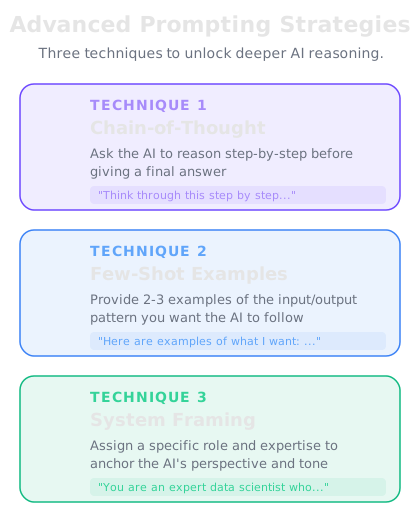
Three advanced prompting strategies β€” Chain-of-Thought, Few-Shot, and System Framing
Advanced prompting techniques that unlock ChatGPT's full potential.

Chain-of-thought prompting

Chain-of-thought prompting means explicitly asking ChatGPT to reason through a problem step by step before giving you a final answer. Instead of jumping straight to a conclusion, it shows its work β€” and that process of "thinking out loud" dramatically improves accuracy.

Why it works: When ChatGPT generates an answer in one shot, it can skip over important nuances or make logical leaps that lead to errors. When you ask it to think step by step, each step builds on the previous one, catching mistakes along the way.

How to use it: Add phrases like these to your prompts:

- "Think through this step by step."

- "Walk me through your reasoning before giving a final answer."

- "Break this problem down into parts and solve each one."

- "Let's work through this methodically."

When to use it: Chain-of-thought is most valuable for:

- Math and logic problems

- Complex analysis with multiple variables

- Decision-making with tradeoffs

- Debugging code

- Any situation where the "right" answer isn't immediately obvious

Example without chain-of-thought: "Is it better for me to lease or buy a car if I drive 20,000 miles a year?" β€” You'll get a general answer.

Example with chain-of-thought: "I drive 20,000 miles a year, plan to keep the car for 5 years, and have $5,000 for a down payment. Think through the financial comparison of leasing vs. buying step by step, including total cost, mileage penalties, depreciation, and opportunity cost of the down payment." β€” You'll get a thorough, structured analysis.

πŸ€–
ChatGPT
online
I'm trying to decide whether to hire a full-time employee or use contractors for my small business. Think through the key factors step by step.
Let me break this down systematically: **Step 1: Cost Comparison** - Full-time employee: Salary + benefits (health insurance, PTO, retirement) + payroll taxes. Benefits typically add 25-40% on top of salary. - Contractor: Higher hourly rate, but no benefits, no payroll taxes, no overhead. - *Key question:* How many hours/week do you need? If it's 30+, full-time often wins on cost. **Step 2: Work Nature** - Is the work ongoing and core to your business? β†’ Leans toward employee - Is it project-based or specialized? β†’ Leans toward contractor - Do you need consistent availability? β†’ Employee - Do you need flexible scaling? β†’ Contractor **Step 3: Control & Quality** - Employee: You set hours, processes, tools. More control, more consistency. - Contractor: They control how they work. You specify the outcome, not the process. **Step 4: Legal & Compliance** - Misclassifying an employee as a contractor carries serious legal risk. If someone works set hours, uses your equipment, and only works for you β€” they're legally an employee regardless of what you call them. **Step 5: Growth Trajectory** - If you expect the workload to grow, hiring now builds institutional knowledge. - If uncertain, starting with a contractor lets you test before committing. **My recommendation:** Start with a contractor for 2-3 months to validate the workload. If it's consistent 30+ hours/week and core to your business, transition to a full-time hire. This gives you data before committing.
↻ Replay conversation
Knowledge Check
What is chain-of-thought prompting?
A
Asking ChatGPT to use bullet points in its responses
B
Sending a series of follow-up questions one at a time
C
Asking ChatGPT to reason through a problem step by step before giving a final answer
D
Using Thinking mode instead of regular mode
Chain-of-thought prompting is the technique of explicitly asking ChatGPT to break down its reasoning and work through a problem step by step. This leads to more accurate and thorough responses, especially for complex problems.

Few-shot prompting

Few-shot prompting means giving ChatGPT examples of what you want before asking it to produce something. Instead of describing the format or style you want, you show it.

Why it works: Examples are often clearer than instructions. Showing ChatGPT two or three examples of the output you want is more effective than writing a paragraph explaining the format, tone, or structure.

How to use it: Include 2-4 examples in your prompt, then ask ChatGPT to follow the same pattern.

Here's the structure:

1. Provide your examples (the "shots")

2. Label them clearly so ChatGPT knows they're examples

3. Then give it the new input and ask it to follow the pattern

Example β€” generating product descriptions:

"Here are examples of product descriptions in our brand voice:

Product: Bamboo Cutting Board

Description: Your kitchen deserves better than plastic. Our bamboo cutting board is naturally antimicrobial, gentle on your knives, and looks gorgeous on your counter. Built to last for years of daily use.

Product: Stainless Steel Water Bottle

Description: Ditch the disposable bottles. Double-walled vacuum insulation keeps drinks cold for 24 hours or hot for 12. No sweating, no leaking, no compromise.

Now write a description in the same style for:

Product: Organic Cotton Tote Bag"

This approach works for any type of content β€” emails, code comments, social media posts, data formatting, translations, and more. The examples teach ChatGPT your specific style better than any instruction could.

Knowledge Check
When is few-shot prompting most useful?
A
When you want shorter responses
B
When you want output in a specific style or format that's easier to show than describe
C
When you're having a casual conversation
D
When you want ChatGPT to search the web for information
Few-shot prompting shines when you need output in a specific style, format, or voice. Instead of trying to describe exactly what you want with words, you provide examples, and ChatGPT patterns its response accordingly. This is especially useful for brand-voice content, structured data, and consistent formatting.

System-level framing

System-level framing means setting the context, role, expertise, and constraints for ChatGPT at the very beginning of your conversation. Think of it as giving ChatGPT a character brief before the performance begins.

Why it works: ChatGPT adapts its behavior based on context. If you tell it to act as an experienced tax accountant, its responses about tax questions will be more precise, use correct terminology, and consider edge cases that a generic response would miss.

How to use it: Start your conversation (or your prompt) with a framing statement that includes:

- Role: Who ChatGPT should act as

- Expertise level: What knowledge it should draw on

- Audience: Who the output is for

- Constraints: What to include, exclude, or prioritize

- Format: How the response should be structured

Example framings:

"You are a senior financial analyst with 15 years of experience in SaaS metrics. I'm going to share my company's data and I need you to analyze it the way you would for a board presentation β€” concise, insight-driven, with clear recommendations."

"Act as an experienced pediatrician. I'm a first-time parent with questions about my 6-month-old. Explain things in plain language, avoid unnecessary jargon, and always note when something warrants an in-person doctor visit."

"You are a copy editor at a major publishing house. Review the text I provide for clarity, grammar, pacing, and consistency. Flag issues but also explain why they're issues so I can learn."

System-level framing is especially powerful when combined with Custom Instructions or Custom GPTs β€” you set the framing once, and every conversation benefits from it.

πŸ€–
ChatGPT
online
You are a seasoned technical recruiter who has hired for FAANG companies. I'm preparing for a software engineering interview at a top tech company. Help me practice by asking me a system design question, then evaluate my answer the way a real interviewer would β€” noting strengths, weaknesses, and what would move me from a "hire" to a "strong hire."
Great framing β€” let's do this. **System Design Question:** Design a URL shortening service like bit.ly. It should handle: - 100 million new URLs per month - 10 billion redirects per month - URLs should expire after a configurable time - Analytics: track click counts and geographic distribution **Requirements to address:** 1. High-level architecture 2. Database schema 3. How you'll generate unique short URLs 4. How you'll handle the read-heavy traffic pattern 5. Scalability considerations Take your time and walk me through your design. I'll evaluate it on: - **Completeness** β€” Did you cover all requirements? - **Depth** β€” Did you go beyond surface-level? - **Tradeoffs** β€” Did you discuss alternatives and justify choices? - **Communication** β€” Was your explanation clear and structured? Whenever you're ready, share your design.
↻ Replay conversation
Knowledge Check
What is the main benefit of system-level framing in your prompts?
A
It reduces the number of tokens used
B
It makes ChatGPT respond faster
C
It shapes ChatGPT's expertise, tone, and focus for more relevant and precise responses
D
It unlocks hidden features that are otherwise unavailable
System-level framing tells ChatGPT who to be, what knowledge to draw on, who the audience is, and what constraints to follow. This context-setting produces responses that are more relevant, more precise, and better tailored to your specific situation than generic prompts would get.

Leveraging Thinking mode and combining techniques

Thinking mode is ChatGPT's built-in chain-of-thought feature. When you toggle it on (via the model selector), ChatGPT will automatically reason through problems more carefully before responding. The AI shows an expandable "thinking" section so you can see its reasoning process.

When to use Thinking mode vs. manual chain-of-thought:

- Thinking mode is best when you want the AI to decide how to think through the problem. Great for math, logic, coding, and analysis.

- Manual chain-of-thought (adding "think step by step" to your prompt) is best when you want to control the structure of the reasoning yourself.

- Combining both β€” using Thinking mode AND a structured prompt β€” is the highest-quality approach for truly complex tasks.

The real power: combining all four techniques. The most effective prompts often layer multiple strategies:

1. System-level framing sets the context and role

2. Few-shot examples show the desired output format

3. Chain-of-thought requests structured reasoning

4. Thinking mode adds an extra layer of AI deliberation

Here's what a combined approach looks like: "You are a senior data scientist (framing). I'll show you two examples of how I want insights presented (few-shot). For each dataset I share, first analyze the statistical significance of the trends step by step (chain-of-thought), then present your findings in the same format as the examples."

With Thinking mode toggled on, ChatGPT will add its own deeper reasoning layer on top of your structured prompt. This is how power users consistently get exceptional results.

Knowledge Check
What is the most effective approach for a truly complex task?
A
Using few-shot prompting alone with many examples
B
Using only Thinking mode and keeping the prompt simple
C
Writing a very long, detailed prompt without any examples
D
Combining system-level framing, few-shot examples, chain-of-thought instructions, and Thinking mode
The most effective approach layers multiple techniques together. System-level framing sets context, few-shot examples show desired output, chain-of-thought structures the reasoning, and Thinking mode adds the AI's own deliberation. Each technique addresses a different aspect of getting a high-quality response.
πŸ€–
ChatGPT
online
I've been using ChatGPT for a month but my results are hit or miss. What's the single biggest mistake people make with prompting?
The single biggest mistake is **being vague and expecting ChatGPT to read your mind**. Here's what I mean. Compare these: **Vague:** "Write me a marketing email." **Specific:** "Write a marketing email for our B2B SaaS product aimed at CFOs. Tone: professional but warm. Length: 150-200 words. Goal: get them to book a demo. Include a clear CTA and one customer proof point." The vague prompt will give you *something*. The specific prompt will give you something *useful*. **The fix is simple β€” before you send a prompt, ask yourself:** 1. Did I specify the role or context? 2. Did I describe who the output is for? 3. Did I set constraints (length, tone, format)? 4. Did I say what "good" looks like? 5. Did I share any examples? You don't need all five every time. But hitting even 2-3 of these consistently will transform your results. The time you invest in crafting the prompt saves far more time in revisions.
↻ Replay conversation
🧠
Day 27 Complete
"Master four advanced prompting techniques β€” chain-of-thought, few-shot, system-level framing, and Thinking mode β€” and you'll consistently unlock ChatGPT's best work. The quality of the output mirrors the quality of the input."
Tomorrow β€” Day 28
Your ChatGPT Mastery
We'll wrap up the course with a full recap of everything you've learned and help you build your personal ChatGPT workflow going forward.
πŸ”₯1
1 day streak!