Custom GPTs
ChatGPT is powerful out of the box, but what if you could create a version of it that is purpose-built for a specific job? One that already knows your industry terminology, follows your exact guidelines, and has access to your reference documents every single time?
That is what Custom GPTs are. They are your own tailored AI assistants, built on top of ChatGPT, with custom instructions, uploaded knowledge files, and optional tool integrations. No coding required.
Today you will learn how to create a Custom GPT from scratch, configure it for real use cases, and even share or publish it for others to use.
What is a Custom GPT?
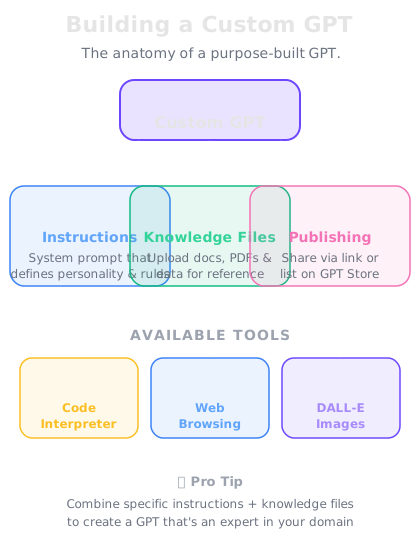
A Custom GPT is a specialized version of ChatGPT that you configure for a specific purpose. It has three layers of customization:
Instructions -- persistent rules that define how the GPT behaves. These are like system-level prompts that apply to every conversation. You might instruct it to always respond in a certain tone, follow a specific framework, or ask clarifying questions before answering.
Knowledge files -- documents you upload that the GPT can reference. These could be style guides, product documentation, FAQs, research papers, or any other reference material. The GPT searches these files when answering questions.
Tools -- built-in capabilities you can enable or disable, such as web browsing, image generation (DALL-E), and code execution (Code Interpreter). You choose which tools your GPT can use.
The result is an AI assistant that feels like it was custom-built for your exact needs.
Building a Custom GPT step by step
Let's walk through the actual creation process:
Step 1: Open the GPT Builder. Navigate to "My GPTs" and click "Create a GPT." You will see two options: a conversational builder (where you describe what you want and ChatGPT helps you configure it) and a manual configuration panel.
Step 2: Write your instructions. This is the most important step. Your instructions define the personality, rules, and behavior of your GPT. Be specific and thorough:
- Define the role: "You are a technical writing assistant for a software company."
- Set the tone: "Write in a clear, concise style. Avoid jargon unless the user uses it first."
- Add constraints: "Never reveal internal pricing. Always suggest the user contact sales for custom quotes."
- Include workflows: "When asked to review a document, first identify the audience, then check for clarity, then suggest improvements."
Step 3: Upload knowledge files. Drag and drop your documents. The GPT will automatically index and search them when answering questions. Supported formats include PDF, Word documents, text files, spreadsheets, and more.
Step 4: Configure tools. Toggle on the capabilities your GPT needs. Web browsing for up-to-date information. DALL-E for image generation. Code Interpreter for data analysis and calculations.
Step 5: Test and iterate. Before sharing, test your GPT with the kinds of questions it will actually receive. Refine instructions based on where it falls short.
Use cases that work well
Custom GPTs are ideal for any task that you do repeatedly with specific requirements:
Customer support bot. Upload your product docs, FAQs, and policies. Instruct it to answer only from the knowledge base and escalate when unsure. Share with your support team.
Writing assistant. Upload your style guide and past writing samples. Instruct it to match your voice, suggest edits, and flag inconsistencies. Perfect for maintaining brand voice across a team.
Data analyzer. Upload data templates and reporting guidelines. Enable Code Interpreter so it can process spreadsheets, run calculations, and generate charts.
Onboarding guide. Upload your company handbook, org chart, and process documents. New employees can ask it anything about how the company works.
Sales assistant. Upload product specs, competitive comparisons, and pricing frameworks. It helps sales reps quickly find answers during prospect calls.
Publishing to the GPT Store
If you build a Custom GPT that could help others beyond your organization, you can publish it to the GPT Store -- a marketplace where anyone can discover and use Custom GPTs.
To publish:
1. Verify your builder profile -- confirm your name or brand
2. Write a compelling description -- explain what your GPT does, who it is for, and what makes it useful
3. Set the visibility to Public
4. Submit for review -- OpenAI checks that it follows usage policies
The GPT Store has categories like Writing, Productivity, Research, Programming, Education, and more. Popular GPTs appear in featured sections, driving organic discovery.
For teams and organizations, ChatGPT Enterprise and Team plans allow you to share Custom GPTs within your workspace. Team members can use them without them being publicly listed.