Day 4 of 28 · ChatGPT Course
Writing Effective Prompts
⏱ 7 min
📊 Beginner
If there's one skill that separates people who love ChatGPT from people who think it's overhyped, it's prompting. A prompt is simply what you type into the chat — your instruction, your question, your request. And small changes in how you write it can produce dramatically different results.
Today you'll learn a repeatable formula for writing prompts that work, see side-by-side comparisons of vague vs. specific prompts, and understand the most common mistakes that trip up beginners. This is arguably the most important lesson in the entire course.
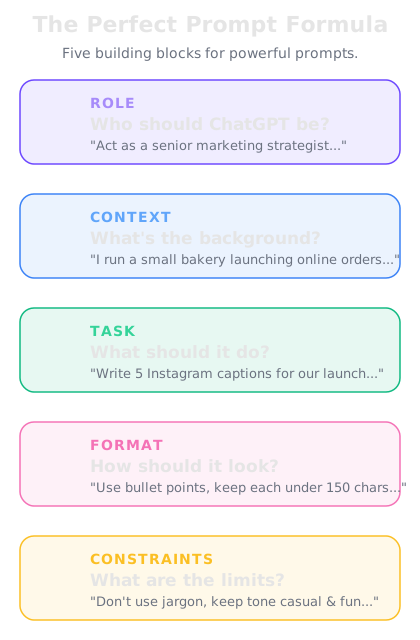
The five components of an effective prompt.
The prompt formula — Role + Context + Task + Format + Constraints
Great prompts aren't random. They follow a pattern. Here are the five elements that, when combined, consistently produce excellent results:
Role — Tell ChatGPT who to be. "You are an experienced copywriter," "Act as a financial advisor," or "You're a patient teacher explaining to a 10-year-old." This sets the tone, vocabulary, and perspective.
Context — Give background information. Who is this for? What's the situation? What has already happened? The more relevant context you provide, the more tailored the response will be.
Task — State clearly what you want ChatGPT to do. "Write," "Analyze," "Compare," "Summarize," "Create a list of," "Explain." Use direct, action-oriented language.
Format — Specify how you want the output structured. "In bullet points," "As a table," "In 3 paragraphs," "As a numbered step-by-step guide," "In markdown." ChatGPT follows formatting instructions very well.
Constraints — Set boundaries. "Under 200 words," "Don't use jargon," "Include at least 3 examples," "Write at a 6th-grade reading level," "Don't include pricing." Constraints prevent the output from going off track.
You don't need all five elements every time. But the more you include, the better your results will be.
You are an experienced career coach who specializes in tech industry job transitions. I'm a marketing manager with 5 years of experience considering a move into product management. Write a 90-day transition plan organized by month, with 3-4 specific action items per month. Keep it practical — no generic advice like "network more." Under 300 words.
**Your 90-Day Marketing-to-Product Management Transition Plan**
**Month 1: Build the Foundation**
- Complete a product management fundamentals course (Reforge or Lenny's PM course recommended)
- Read "Inspired" by Marty Cagan — focus on chapters about product discovery
- Rewrite your resume to reframe marketing campaigns as "product launches" with metrics and user impact
- Set up 5 coffee chats with PMs at your current company to understand their daily workflow
**Month 2: Create Evidence**
- Volunteer for a cross-functional project at work that involves product decisions
- Build a product case study: pick a product you use daily, identify 3 problems, propose solutions with wireframes
- Start a simple portfolio site showcasing your case study and relevant marketing-to-PM skills
- Join a PM community (Lenny's Slack, Product Hunt discussions) and contribute thoughtfully
**Month 3: Execute the Transition**
- Apply to 15-20 PM roles, prioritizing companies where marketing experience is valued (B2C, growth-stage startups)
- Practice PM interview frameworks: CIRCLES method for product design, estimation questions, metrics questions
- Ask your current manager about internal PM openings — internal transfers have a 3x higher success rate
- Refine your "why PM" story until you can tell it in 60 seconds without hesitation
**Key advantage you already have:** Marketing managers who move into PM bring customer empathy, data analysis skills, and go-to-market expertise that many junior PMs lack. Lead with that.
↻ Replay conversation
Knowledge Check
What are the five elements of an effective prompt?
A
Who, What, When, Where, Why
B
Role, Context, Task, Format, Constraints
C
Question, Answer, Follow-up, Review, Submit
D
Introduction, Body, Conclusion, Summary, Review
The prompt formula is Role (who ChatGPT should be), Context (background information), Task (what to do), Format (how to structure the output), and Constraints (boundaries and limits). Using these elements consistently produces much better results.
Vague vs. specific — side-by-side comparisons
Let's look at three real examples showing how specificity transforms results.
Example 1 — Content creation:
- Vague: "Write a blog post about fitness."
- Specific: "Write a 600-word blog post titled '5 Morning Exercises You Can Do Without Equipment' targeting busy parents. Use a conversational, encouraging tone. Include time estimates for each exercise."
Example 2 — Data analysis:
- Vague: "Help me with my data."
- Specific: "I have monthly sales data for 12 products over the past year. I'll upload a CSV. Please identify the top 3 products by revenue growth rate, flag any products with declining sales for 3+ consecutive months, and present findings in a summary table."
Example 3 — Learning:
- Vague: "Explain machine learning."
- Specific: "Explain machine learning to me as if I'm a small business owner with no tech background. Use analogies from running a restaurant. Focus on practical applications I could use, not theory. Keep it under 200 words."
In every case, the specific prompt took maybe 30 extra seconds to write — but saved minutes of back-and-forth refinement and produced a far better first response.
Knowledge Check
Which prompt would produce a better result for creating a social media post?
A
"Make me a really good Instagram post that goes viral"
B
"Write an Instagram caption for our new organic protein bar. Target audience: fitness-conscious millennials. Tone: energetic but not pushy. Include a call-to-action to visit our website. Under 150 characters plus 5 relevant hashtags."
C
"Write a social media post"
D
"Write something about our new product launch for Instagram"
The third option gives ChatGPT everything it needs: platform (Instagram), product (organic protein bar), audience (fitness millennials), tone (energetic, not pushy), requirements (CTA, hashtags), and constraints (character limit). More detail means less guesswork.
Iterating on outputs — the refinement loop
Even with a great prompt, you rarely get the perfect output on the first try. That's normal. The real skill is knowing how to refine the response through follow-up instructions.
Here are the most effective refinement techniques:
Adjust tone: "Make this more formal" / "This feels too stiff — make it warmer and more conversational"
Change length: "Cut this in half" / "Expand the section on pricing — add more detail and examples"
Shift focus: "De-emphasize the technical details and focus more on business impact"
Request alternatives: "Give me 3 completely different approaches to this" / "That's good for a CEO audience — now rewrite it for a junior employee"
Add missing elements: "Good, but add a specific example for each point" / "Include data or statistics to support the claims"
Fix problems: "The second paragraph contradicts the first — reconcile them" / "Remove all the buzzwords and use plain language"
Write a product description for our new wireless earbuds called "AirPulse Pro."
**AirPulse Pro Wireless Earbuds**
Experience premium sound with the AirPulse Pro. Featuring advanced noise cancellation, 36-hour battery life, and a comfortable ergonomic design, these earbuds deliver studio-quality audio wherever you go. With Bluetooth 5.4 connectivity and water resistance, they're built for your active lifestyle.
Good start, but make it sound less like every other earbud listing. Give it personality. Our brand voice is bold and a little irreverent.
**AirPulse Pro**
*Your old earbuds are jealous.*
36 hours of battery. Noise cancellation that actually works. Sound so crisp you'll hear things in your favorite songs you never knew were there.
We didn't build another pair of earbuds. We built the pair that makes you wonder why you put up with anything else. Sweat-proof. Rain-proof. Awkward-gym-playlist-proof.
**AirPulse Pro.** Plug in. Tune out. Turn up.
Perfect tone. Now write a 30-second script for a video ad using this same voice.
**[AirPulse Pro — 30-Second Video Ad Script]**
*[Opens on someone yanking out tangled wired earbuds, frustrated]*
VO: "You deserve better than this."
*[Cut to: AirPulse Pro case opening. Earbuds lift out.]*
VO: "AirPulse Pro. 36 hours of battery. Noise cancellation that actually cancels noise. Sound that makes your playlist hit different."
*[Quick cuts: running in rain, on a plane, at a coffee shop — all with AirPulse Pro]*
VO: "Sweat-proof. Rain-proof. Bad-day-proof."
*[Final shot: logo and tagline]*
VO: "AirPulse Pro. Plug in. Tune out. Turn up."
*[End card: website URL]*
↻ Replay conversation
Knowledge Check
What is the best way to get ChatGPT to change the tone of a response?
A
Switch to a more expensive model
B
Start a new conversation and hope for a different result
C
Type "try again" with no additional guidance
D
Give specific feedback about what tone you want — "make it more casual" or "use a bold, irreverent brand voice"
Specific feedback is the key. Telling ChatGPT exactly what tone shift you want — with descriptive words or examples — lets it adjust precisely. Vague requests like "try again" don't give it enough direction to improve.
Common prompting mistakes (and how to fix them)
After working with thousands of users, these are the patterns that consistently lead to disappointing results:
Mistake 1: Too vague. "Help me with my resume." Fix: "Review my resume (attached) for a senior product manager role at a tech startup. Identify weak bullet points and rewrite them using the STAR method with quantified results."
Mistake 2: Too much at once. Asking ChatGPT to write a full business plan, marketing strategy, financial projections, and team structure in a single prompt. Fix: Break complex tasks into sequential steps. Do the business plan first, then the marketing strategy, building on the previous output.
Mistake 3: No context about the audience. "Write a presentation about AI." For whom? A room of executives? A classroom of high schoolers? A tech conference? Fix: Always specify who will consume the output.
Mistake 4: Forgetting you can iterate. Spending 10 minutes crafting the "perfect" prompt instead of starting with a decent one and refining. Fix: Get a first draft quickly, then shape it through conversation. Two rounds of feedback usually beats one over-engineered prompt.
Mistake 5: Not specifying format. If you want a table, say so. If you want bullet points, say so. If you want code with comments, say so. ChatGPT defaults to paragraphs — which isn't always what you need.
Knowledge Check
You asked ChatGPT to "write about leadership" and got a generic, unhelpful response. What's the most likely problem?
A
You need to upgrade to a paid plan for better writing
B
ChatGPT isn't capable of writing about leadership
C
You should have used o3 instead of GPT-5.2
D
The prompt was too vague — it lacked context, audience, format, and purpose
"Write about leadership" gives ChatGPT almost nothing to work with. Adding context (for what purpose?), audience (for whom?), format (blog post? speech? bullet points?), and constraints (length, tone, angle) would transform the output. The model is the same — the prompt is the variable.
🚀
Day 4 Complete
"The prompt formula — Role, Context, Task, Format, Constraints — is your secret weapon. Use it, and you'll get better results than 90% of ChatGPT users. Tomorrow, we'll make ChatGPT remember your preferences permanently."
Tomorrow — Day 5
Custom Instructions & Memory
You'll learn how to set up persistent instructions so ChatGPT always knows your preferences, plus how to use the Memory feature to make it truly personal.