Day 4 of 28 · OpenClaw Challenge
Tools — The Agent's Hands
⏱ 6 min
📊 Beginner
You've learned that OpenClaw has a brain (the AI model) and a process (the agent loop). But a brain without hands can't do anything.
Today you'll learn about tools — the bridges between the AI brain and the real world.
Quick Recall
What are the four steps of the agent loop?
A
Read, Plan, Execute, Send
B
Ask, Search, Answer, Repeat
C
Observe, Think, Act, Report
D
Connect, Process, Respond, Disconnect
Observe → Think → Act → Report. And when conditions change, the agent loops back and adapts.
What is a tool?
A tool is a specific capability you give your agent. Each tool does one thing well.
The email tool reads and sends emails. The calendar tool manages events. The web browser tool searches and reads websites. The file tool reads documents on your computer. The code tool writes and runs code.
Think of the agent as a contractor, and tools as what's in their toolbox. A contractor without tools can look at your house and tell you what's wrong. A contractor with tools can actually fix it.
Knowledge Check
What's the best analogy for an AI agent's "tools"?
A
Tools in a contractor's toolbox — each one does a specific job
B
Plugins that make the AI smarter
D
Different AI models running in parallel
Tools don't make the AI smarter — they give it the ability to act. Each tool is a specific capability, like a hammer or a drill in a toolbox. The agent picks the right one for the job.
How the agent picks the right tool
Here's the clever part: you don't tell the agent which tool to use. You tell it what you want, and it figures out the tools itself.
Watch what happens when you ask a single question that requires multiple tools:
Prepare me for my meeting with Sarah at 2pm.
On it — pulling together what you need...
Here's your prep for the 2pm meeting with Sarah:
📅 **Meeting**: Product roadmap review (you + Sarah + Mike)
📎 **Shared doc**: Q1 Roadmap — last edited by Sarah yesterday
📝 **Key changes**: She moved the auth feature to Q2 and added a new analytics dashboard
✉️ **Recent emails**: Sarah sent you 2 messages this week about timeline concerns
💡 **Suggested talking points**:
1. Discuss the auth feature delay
2. Align on analytics dashboard scope
3. Address her timeline concerns from email
You're all set. Want me to draft an agenda and send it to the group?
↻ Replay conversation
Behind the scenes, the agent used four different tools in that single response:
Calendar tool → found the meeting details, attendees, and time
File tool → opened the shared roadmap document and read the changes
Email tool → searched for recent messages from Sarah
AI reasoning → synthesized everything into actionable talking points
You asked one question. The agent picked four tools, used them in the right order, and combined the results into a single, useful answer.
Knowledge Check
How many tools did the agent use to prepare for the Sarah meeting?
A
Four — calendar, file, email, and AI reasoning
B
None — it made up the answer
C
One — it just searched your calendar
D
Two — calendar and email
The agent chained four capabilities together: calendar (meeting details), files (the shared doc), email (Sarah's messages), and its own reasoning (talking points). One question, four tools, one cohesive answer.
The tool ecosystem
OpenClaw doesn't come with a fixed set of tools. There's an entire ecosystem of community-built tools you can add.
Need to connect to Slack? There's a tool for that. Jira? Tool for that. Your company's internal API? You can build a tool for that too (we'll cover this in Week 4).
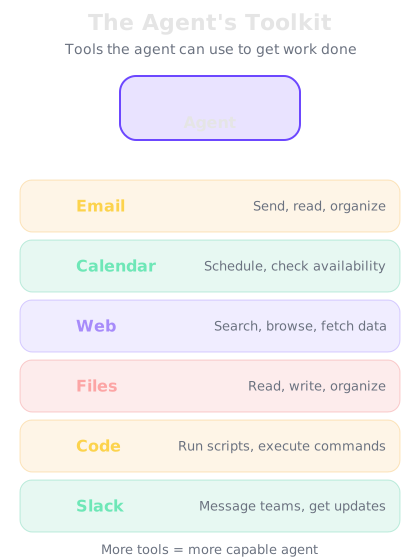
The agent sits at the center. Each tool gives it a specific capability — all connected via the MCP protocol.
The universal connector
The ecosystem is built on a standard called MCP — the Model Context Protocol. It's like USB for AI agents. Any tool built with MCP plugs right into OpenClaw. No custom code, no compatibility issues.
Knowledge Check
What is MCP (Model Context Protocol)?
A
A programming language for building agents
B
A security protocol for protecting your data
C
A new AI model made by OpenAI
D
A standard that lets any tool plug into OpenClaw — like USB for AI agents
MCP is the universal connector for AI agent tools. Build a tool using the MCP standard, and it works with any MCP-compatible agent — including OpenClaw. It's what makes the tool ecosystem so powerful.
Final Check
If OpenClaw doesn't have a tool for your company's internal dashboard, what can you do?
A
Build your own tool using MCP, or find one in the community ecosystem
B
Nothing — you're limited to the built-in tools
C
Wait for someone to build it and hope for the best
D
Switch to a different AI agent that supports it
That's the beauty of an open ecosystem. You can build custom tools using MCP, or browse the community for pre-built ones. You're never limited to what ships out of the box.
🔧
Day 4 Complete
"Tools turn an AI brain into an AI worker. And with MCP, you can add any tool you need."
Tomorrow — Day 5
Install OpenClaw
Time to get your hands dirty. We'll install OpenClaw on your machine step by step.