Day 23 of 28 · Vibe Coding Challenge
Payments and Subscriptions
⏱ 7 min
📊 Intermediate
Your product works. People want it. Now they need to pay for it. Today you'll integrate Stripe — the payment system used by Amazon, Google, Shopify, and millions of startups.
Don't let payments intimidate you. Stripe handles 99% of the complexity. You just connect it.
Why Stripe?
Stripe is the standard for online payments. Here's why:
It handles everything. Credit cards, debit cards, Apple Pay, Google Pay, bank transfers — all through one integration.
It's global. 135+ currencies, 46 countries. Your customers can pay from anywhere.
It manages subscriptions. Free trials, monthly billing, annual discounts, upgrades, downgrades, cancellations — Stripe handles all of it.
It's secure. PCI compliance, fraud detection, encryption. You never see or store credit card numbers.
It has a generous free tier. No monthly fees. You only pay 2.9% + 30¢ per transaction.
Knowledge Check
Why should you use Stripe instead of building your own payment system?
A
You can't accept payments without Stripe
B
Payments involve security, compliance, fraud detection, and international regulations — Stripe handles all of this so you don't have to
C
Stripe is the cheapest option
D
Custom payment systems are always better
Processing payments means handling sensitive credit card data, complying with PCI security standards, detecting fraud, managing refunds, and supporting international currencies. Building this yourself would take months and carry enormous risk. Stripe does it all with a few API calls.
Setting up Stripe
Here's the process:
1. Create an account at stripe.com (free, takes 2 minutes)
2. Get your API keys from the Stripe dashboard (test keys for development, live keys for production)
3. Tell your AI to integrate Stripe into your app
Add Stripe payments to my InvoiceFlow app. I need three subscription plans:
- Free: $0/mo, 5 invoices per month
- Pro: $12/mo, unlimited invoices, PDF export, email sending
- Team: $29/mo, everything in Pro + team members, priority support
Users should be able to subscribe, manage their plan, and cancel from a billing settings page. Include a 14-day free trial for Pro and Team.
Stripe integration added ✓
💳 **Checkout flow**
- Pricing page with three tiers (Free highlighted, Pro marked "Most Popular")
- Clicking "Start Free Trial" or "Subscribe" opens Stripe Checkout
- Secure payment form handled entirely by Stripe
📊 **Billing settings page**
- Current plan display
- Usage meter (X of 5 invoices used — Free tier)
- "Upgrade Plan" button
- "Manage Subscription" links to Stripe Customer Portal
- Cancel subscription option
🔒 **Backend**
- Stripe webhook listener for payment events
- Automatic plan activation after successful payment
- 14-day free trial — no charge until trial ends
- Feature gating: invoice creation checks user's plan limits
Using Stripe test mode — switch to live keys when ready to accept real payments.
↻ Replay conversation
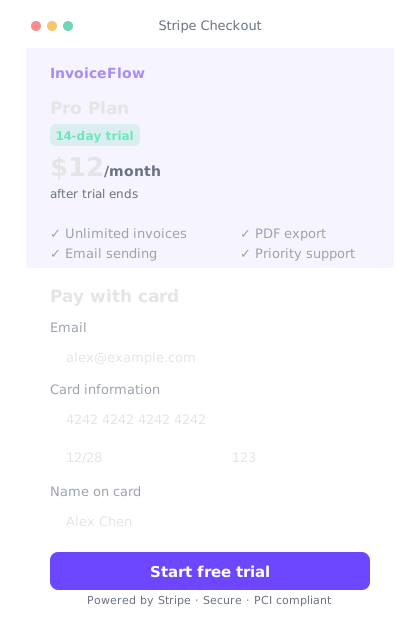
Stripe Checkout handles the entire payment flow — you just connect it.
Knowledge Check
What happens during the 14-day free trial?
A
Users must enter payment info but are never charged
B
Users get full access to Pro/Team features with no charge — Stripe automatically charges them after 14 days unless they cancel
C
Users get full access and are charged immediately
D
Users get limited access for free
Free trials let users experience the full product before paying. Stripe handles the trial period automatically — it collects payment info upfront but doesn't charge until the trial ends. Users can cancel anytime during the trial without being charged.
The Stripe Customer Portal
Here's a secret that saves you tons of work: Stripe has a Customer Portal — a pre-built page where users can manage their subscription, update payment info, view invoices, and cancel. You don't need to build any of this yourself.
Instead of building a custom billing management page, use the Stripe Customer Portal. Add a "Manage Billing" button that redirects users to their Stripe portal.
Done ✓
🔗 "Manage Billing" button added to the settings page
📋 Redirects to Stripe Customer Portal where users can:
- View and download past invoices
- Update credit card
- Change plan (upgrade/downgrade)
- Cancel subscription
One button, zero custom billing UI to maintain. Stripe handles all of it.
↻ Replay conversation
One-time payments
Not every product needs subscriptions. Sometimes you just want to sell something once — a template, a course, a digital download.
I'm selling a Notion template pack for $29. Add a simple checkout flow — user clicks "Buy Now", enters payment info, and gets access to a download page after purchase. No subscriptions, just a one-time payment.
One-time checkout added ✓
🛒 "Buy Now — $29" button on the product page
💳 Redirects to Stripe Checkout (pre-filled with product details)
✅ After payment, redirects to /download with download links
🔗 Unique download link sent via email as backup
**Stripe webhook** confirms payment before granting access — no way to bypass. Test with Stripe test card: 4242 4242 4242 4242.
↻ Replay conversation
Knowledge Check
What Stripe test card number can you use during development?
B
Your real credit card number
Stripe provides test card numbers for development. 4242 4242 4242 4242 always succeeds. There are also test numbers for declined cards, expired cards, and different card brands. You never use real card numbers during development.
Common payment patterns
Freemium — Free tier with limited features, paid tiers unlock more. Most SaaS products use this.
Free trial — Full access for X days, then payment required. Great for complex products.
One-time purchase — Pay once, access forever. Good for templates, courses, digital products.
Usage-based — Pay per use (per API call, per image generated, per user). Used by OpenAI, AWS, and similar services.
Lifetime deal — Pay once for permanent access to a subscription product. Popular on AppSumo for early-stage products.
Pick the model that fits your product and users. Freemium with a free trial is the safest starting point for most SaaS products.
Final Check
What's the most common pricing model for new SaaS products?
A
Freemium — a free tier with limited features and paid tiers for full access
B
Enterprise-only pricing
Freemium works best for most new products. The free tier removes the barrier to entry — users can try it without risk. Once they see the value, upgrading to a paid plan feels natural. Start with freemium, add other models later if needed.
💰
Day 23 Complete
"Stripe handles payments so you can focus on the product. Plug it in, start charging, keep building."
Tomorrow — Day 24
SEO and Analytics
You built it. Now people need to find it. Tomorrow you'll learn SEO and analytics — getting discovered and understanding your users.