Day 25 of 28 · Vibe Coding Challenge
Security Essentials
⏱ 7 min
📊 Intermediate
Your app is live. People are using it. They're trusting you with their data — email addresses, passwords, maybe even payment info. Today you'll learn the security basics that protect your users and your reputation.
You don't need to become a security expert. You need to avoid the common mistakes.
The big three vulnerabilities
Most security breaches come from a small number of mistakes. Here are the three you must avoid:
1. Exposed secrets. API keys, database passwords, and tokens committed to GitHub. Bots scan public repos and steal keys within minutes.
2. No input validation. Trusting user input without checking it. Someone types `<script>alert('hacked')</script>` into your form — and it runs.
3. Broken authentication. Weak password rules, no rate limiting on login, sessions that never expire. These let attackers brute-force their way in.
Knowledge Check
What happens if you accidentally push an API key to a public GitHub repository?
A
Bots can find and steal it within minutes — potentially running up charges or accessing your data
B
GitHub will delete the key for you
C
Nothing — GitHub keeps keys secure
D
The key automatically stops working
Automated bots continuously scan public GitHub repos for API keys, database credentials, and tokens. When they find one, they exploit it immediately — running up API charges, accessing databases, or exfiltrating data. Never commit secrets to Git.
Securing your secrets
Rule #1: Never put secrets in code. Use environment variables (covered on Day 14).
Audit my project for any exposed secrets or sensitive data. Check for API keys, database URLs, passwords, or tokens that might be hardcoded in the source files or committed to Git.
Security audit for secrets ✓
🔴 **Found 2 issues:**
1. `lib/supabase.ts` line 3 — Supabase URL and anon key are hardcoded
→ Moved to environment variables: `process.env.NEXT_PUBLIC_SUPABASE_URL`
2. `.env` file is not in `.gitignore`
→ Added `.env` and `.env.local` to `.gitignore`
🟢 **Already secure:**
- Stripe key is properly using environment variable
- No passwords in source files
- No tokens in Git history
⚠️ **Recommendation:** Run `git log --all --full-history -- .env` to make sure .env was never committed in past commits. If it was, consider rotating those keys.
↻ Replay conversation
Knowledge Check
Where should API keys and database passwords be stored?
A
In a file called secrets.txt in the project root
B
In environment variables, loaded from .env files that are excluded from Git
C
In a comments section of the code
D
In the README so the team can find them
Environment variables keep secrets separate from code. The .env file lives on your machine (or in your deployment platform's settings) but is never committed to Git. This way, your code works without containing any sensitive data.
Protecting against bad input
When users can type into your app, they can type anything — including malicious code. This is called injection, and it's one of the most common attack vectors.
XSS (Cross-Site Scripting) — An attacker injects JavaScript through your form. If your app renders it, the script runs in other users' browsers — stealing cookies, redirecting to phishing sites, or worse.
SQL Injection — An attacker types SQL commands into a form field, and your database executes them. They could delete all your data or access other users' information.
The fix: always validate and sanitize user input.
Add input validation and sanitization to all forms in my app. Protect against XSS and SQL injection. Also add rate limiting to the login endpoint — max 5 attempts per minute per IP.
Security hardened ✓
🛡️ **Input sanitization**
- All user input is escaped before rendering (prevents XSS)
- Using parameterized queries for all database operations (prevents SQL injection)
- HTML tags stripped from text inputs
🔒 **Rate limiting**
- Login endpoint: max 5 attempts per minute per IP
- After 5 failed attempts: 15-minute cooldown
- Cooldown message: "Too many login attempts. Please wait 15 minutes."
✅ **Form validation**
- Email format validation on all email fields
- Password minimum 8 characters, requires letter + number
- All text inputs have max length limits
Using industry-standard libraries for sanitization — not custom regex.
↻ Replay conversation
Knowledge Check
What is the best protection against SQL injection?
A
Checking if the input looks suspicious
B
Adding a CAPTCHA to every form
C
Using parameterized queries — the database treats user input as data, never as commands
D
Blocking certain words like "DROP" and "DELETE"
Parameterized queries (also called prepared statements) are the gold standard. They structurally separate user data from SQL commands, making it impossible for input to be executed as code. Most modern frameworks use them by default — but it's worth verifying.
HTTPS — non-negotiable
HTTPS encrypts data between your user's browser and your server. Without it, anyone on the same WiFi network can see what your users are typing — passwords, personal info, everything.
The good news: if you deploy on Vercel, Netlify, or Railway, HTTPS is automatic. You don't need to do anything.
The check: make sure your URL starts with `https://` not `http://`. If it doesn't, your deployment platform should have a setting to enable it.
The security checklist
Before launching your app to real users, run through this:
Secrets: No API keys or passwords in your code. `.env` in `.gitignore`.
Auth: Strong password requirements. Rate limiting on login. Sessions expire after inactivity.
Input: All user input validated and sanitized. Parameterized database queries.
HTTPS: All traffic encrypted. No mixed content (HTTP resources on an HTTPS page).
Dependencies: Run `npm audit` to check for known vulnerabilities in your packages.
Permissions: Users can only access their own data. Admin routes are properly protected.
Run a full security audit on my app. Check for common vulnerabilities and fix what you find.
Full security audit complete ✓
🔴 **Fixed:**
- 2 API routes were missing authentication checks — added auth middleware
- User ID was coming from the frontend (spoofable) — now extracted from the session token on the backend
🟡 **Improved:**
- Added `HttpOnly` and `Secure` flags to session cookies
- Added CORS headers to restrict which domains can call your API
- Updated 3 packages with known vulnerabilities (`npm audit fix`)
🟢 **Already good:**
- HTTPS active
- Passwords hashed with bcrypt
- Environment variables properly configured
- Input sanitization in place
Your app is significantly more secure now.
↻ Replay conversation
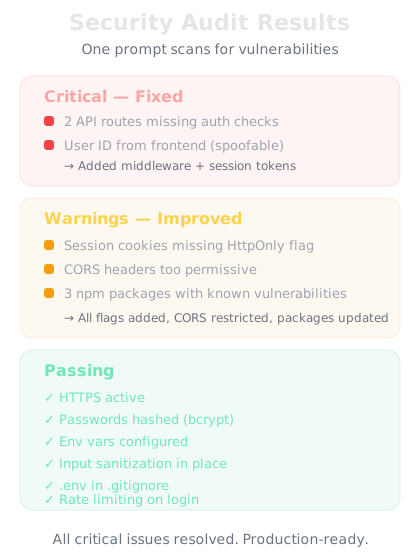
One prompt audits your entire app for security vulnerabilities.
Final Check
What's the most important security action for a vibe coder to take?
A
Hire a security firm before launching
B
Build a custom encryption system
C
Add a "This site is secure" badge to the homepage
D
Use proven services for auth and payments (Supabase Auth, Stripe), keep secrets in environment variables, and validate all user input
Don't build security from scratch — use battle-tested services. Supabase Auth, Stripe, and established frameworks handle the hard security problems. Your job is to use them correctly: keep secrets out of code, validate user input, and protect API routes. Simple discipline prevents most attacks.
🔒
Day 25 Complete
"Security isn't complex — it's careful. Protect secrets, validate input, use proven services."
Tomorrow — Day 26
Advanced Prompting Strategies
You know the basics. Tomorrow you'll learn the advanced techniques that separate good vibe coders from great ones.