Your AI Toolkit for E-commerce
Yesterday you saw the scale of the opportunity. Today you're going to set up the tools that make it real.
You don't need expensive software or a dozen subscriptions. Three free AI tools cover almost everything an e-commerce seller needs — product descriptions, ad copy, long-form content, competitor research, and trend analysis. You'll also learn about the AI features already built into your selling platform.
By the end of today, your toolkit will be ready. Tomorrow, you start producing content.
The big three — ChatGPT, Claude, and Perplexity
These are the three AI tools you'll use throughout this course. Each one has a free tier that's more than enough to get started, and each one is best at different things.
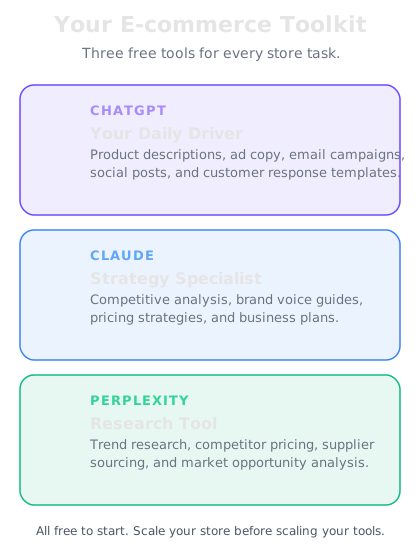
ChatGPT — Your primary workhorse for product descriptions and ad copy. It's fast, creative, and excellent at generating multiple variations of the same content. When you need 10 versions of a product title or 5 different ad angles, ChatGPT is where you go. The free plan gives you generous daily usage with GPT-5.2 Instant, which is more than capable for e-commerce content.
Claude — Your go-to for long-form content and nuanced writing. When you need detailed product guides, brand story pages, A+ Content for Amazon, or blog posts that support your store's SEO, Claude excels. It's particularly good at maintaining a consistent voice across long pieces and following complex formatting instructions. The free plan is powerful enough for daily use.
Perplexity — Your research engine. Unlike ChatGPT and Claude, Perplexity searches the live web and cites its sources. Use it for competitor research (what are the top sellers in your category doing?), trend spotting (what's selling right now?), keyword research (what are buyers searching for?), and market analysis. The free tier gives you solid daily research capability.
When to use which tool
Here's a practical cheat sheet you'll reference throughout this course:
Use ChatGPT when you need:
- Product descriptions (single or batch)
- Ad copy for Facebook, Google, Instagram, TikTok
- Email subject lines and body copy
- Social media captions and hashtags
- Multiple variations of any content for A/B testing
- Quick rewrites in a different tone or style
Use Claude when you need:
- Amazon A+ Content or Enhanced Brand Content
- Detailed product guides or comparison pages
- Blog posts and articles for your store
- Brand story and About Us pages
- Complex formatting with specific structure rules
- Rewriting large batches of content while maintaining consistency
Use Perplexity when you need:
- Competitor pricing and positioning research
- Trending products and categories in your niche
- Keyword research and search volume estimates
- Supplier and sourcing intelligence
- Market size and growth data
- Review analysis — what customers love and hate about competing products
Platform-specific AI tools
Beyond the big three, your selling platform likely has AI features built right in. These are worth knowing about because they integrate directly with your listings:
Shopify Magic — Built into the Shopify admin. It can generate product descriptions, email subject lines, and suggested responses to customer messages. It knows your store context, which gives it an edge for quick edits. However, it's less flexible than ChatGPT or Claude for complex prompts or batch work.
Amazon's AI Listing Tools — Amazon has rolled out AI-generated listing suggestions for titles, bullet points, and descriptions. They're a useful starting point, but they tend to be generic. You'll get much better results with your own prompts in ChatGPT, then pasting the polished version into Amazon.
Etsy's AI Features — Etsy offers AI-suggested tags and listing improvement tips. These are helpful for tag ideas, but your descriptions should come from your own AI workflow to maintain your shop's unique voice.
eBay's Listing Tools — eBay provides AI-assisted listing creation that can pull details from photos. Good for the basics, but you'll want to enhance descriptions with your own AI-generated content for competitive listings.
The strategy: Use platform tools for quick suggestions and starting points. Use the big three for serious content production. The prompts and workflows you build in this course will always outperform one-click platform tools.
Setting up your accounts
Let's get your toolkit ready. This takes about 10 minutes:
Step 1 — ChatGPT — Go to chat.openai.com and create a free account. You can sign up with Google, Apple, or email. Once you're in, you're ready. The free plan gives you access to GPT-5.2 Instant, which is all you need for this course.
Step 2 — Claude — Go to claude.ai and create a free account. Similar sign-up process. Claude's free tier gives you solid daily usage. You'll primarily use Claude for longer content pieces starting in Week 2.
Step 3 — Perplexity — Go to perplexity.ai and create a free account. Perplexity's free tier gives you plenty of searches per day for research tasks.
That's it. Three accounts, all free, set up in 10 minutes. You now have a content production system that would have cost thousands of dollars in software and freelancers just two years ago.
A quick note on AI and your product knowledge
Here's something important before we dive into content creation tomorrow: AI is a multiplier, not a replacement.
The best AI-generated product content comes from sellers who know their products deeply. When you feed AI the right details — materials, dimensions, use cases, what makes your product different, who it's for — the output is excellent. When you give it nothing but a product name, you get generic filler.
Throughout this course, you'll learn to create prompt templates that capture your product knowledge and feed it to AI in a structured way. The AI handles the writing. You provide the expertise that makes the writing accurate and persuasive.
This is why a seller using AI will always outperform AI alone. You know your customers. You know your products. AI knows how to write about them compellingly at scale.