Day 22 of 28 · Vibe Coding Challenge
Building a SaaS Product
⏱ 8 min
📊 Intermediate
Welcome to Week 4. Everything you've learned converges here.
A SaaS (Software as a Service) product is an app people pay to use, delivered through the web. Think Notion, Slack, Canva, or Figma. Today you'll start building one — from idea to working product.
This isn't a toy project. This is how real companies are born.
The anatomy of a SaaS product
Every SaaS product has these core components:
Landing page — Sells the product to visitors (Day 8)
Authentication — Sign up, log in, user accounts (Day 13)
Dashboard — Where users spend most of their time (Day 11)
Core feature — The thing that makes your product valuable
Settings — Account management, preferences, profile
Billing — Free trials, paid plans, subscription management (Day 23)
You already know how to build most of these. Today you put them together into a cohesive product.
Knowledge Check
What distinguishes a SaaS product from a regular web app?
A
SaaS products only work on mobile
B
SaaS products use more advanced code
C
SaaS products must be built by large companies
D
SaaS products are subscription-based services delivered through the web — users pay to access ongoing value
SaaS is a business model — users subscribe to access your software through the web. They don't install anything. They pay monthly or yearly. You maintain and improve the product continuously. It's the dominant software model today.
Let's build one — "InvoiceFlow"
We'll build InvoiceFlow — a simple invoicing tool for freelancers. They can create invoices, send them to clients, and track payments.
This is a real product category. Apps like FreshBooks and Wave charge $15–50/month for this.
Build a SaaS invoicing app called "InvoiceFlow" for freelancers. Use Next.js, Tailwind CSS, and Supabase.
**Landing page:**
- Hero: "Get Paid Faster" headline
- Features: Create invoices, track payments, client management
- Pricing: Free (5 invoices/mo), Pro $12/mo (unlimited), Team $29/mo
- CTA buttons throughout
**App (behind auth):**
- Dashboard with: total outstanding, total paid this month, overdue invoices count
- Invoice list with status (Draft, Sent, Paid, Overdue)
- Create invoice form: client name, line items with description/quantity/rate, tax %, due date, notes
- Auto-calculate totals
- Client list with contact info and invoice history
**Auth:** Supabase auth with email/password and Google sign-in
Building InvoiceFlow...
Done ✓
🌐 **Landing page**
- "Get Paid Faster" hero with gradient
- 3 feature cards with icons
- 3 pricing tiers (Free highlighted as "Start Here")
- Testimonial section, FAQ, footer
📊 **Dashboard**
- $4,250 outstanding | $12,800 paid this month | 2 overdue
- Quick actions: New Invoice, New Client
📋 **Invoice list**
- Table with client, amount, date, status badges
- Filter by status, search by client
✏️ **Create invoice**
- Client selector with autocomplete
- Dynamic line items (add/remove rows)
- Auto-calculating subtotal, tax, and total
- Due date picker and notes field
👥 **Client list**
- Name, email, total invoiced, total paid
- Click to see invoice history
🔐 **Auth**
- Email/password + Google sign-in
- Protected routes
Full-stack with Supabase. This is a real product.
↻ Replay conversation
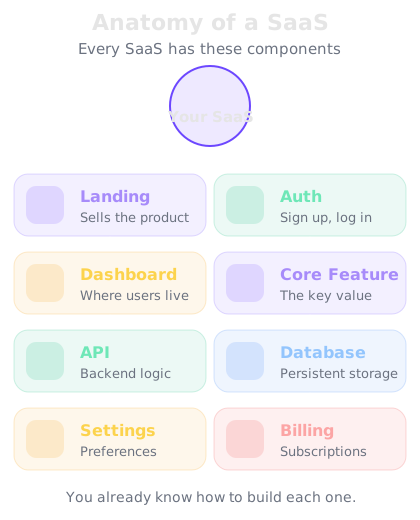
Every SaaS has these core components. You already know how to build each one.
Knowledge Check
How long did it take to build the core of InvoiceFlow?
A
One prompt — the AI built the landing page, auth, dashboard, invoice system, and client management together
One detailed prompt produced a complete SaaS product with landing page, authentication, dashboard, CRUD operations, and client management. It needs polish and iteration, but the core is functional from the start. That's the power of vibe coding applied to real products.
Iterating on your SaaS
The first version is never the final product. Here's the iteration path for a SaaS:
Round 1: Core functionality — Does the main feature work? Can users create invoices and manage clients? (This is what we just built.)
Round 2: Polish — Better design, loading states, error handling, mobile responsiveness. Make it feel professional.
Round 3: Essential features — PDF export, email notifications, payment tracking, recurring invoices.
Round 4: Business features — Billing integration, onboarding flow, settings page, help documentation.
Add these features to InvoiceFlow:
1. PDF export — generate a downloadable PDF of any invoice
2. Email sending — send the invoice directly to the client's email
3. Payment status tracking — clients can mark invoices as paid via a unique link
4. Dashboard chart — monthly revenue over the last 6 months
Features added ✓
📄 **PDF export** — "Download PDF" button on each invoice, generates a professional PDF with your logo, line items, and totals
📧 **Email sending** — "Send to Client" button that sends the invoice as an email with a PDF attachment and a "Pay Now" link
💰 **Payment tracking** — Each invoice has a unique URL. Clients can view and mark as paid. Status auto-updates on your dashboard.
📈 **Revenue chart** — Bar chart on dashboard showing monthly revenue for the last 6 months. Uses Recharts library.
InvoiceFlow is looking like a real product now.
↻ Replay conversation
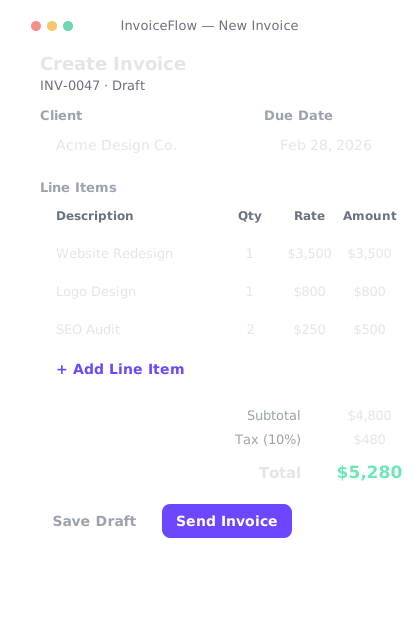
Professional invoice creation — line items, tax calculation, PDF generation.
SaaS ideas you can build this week
These are real product categories where indie makers are earning revenue with vibe-coded apps:
Client portal — Share files and updates with clients in a branded dashboard
Appointment scheduler — Calendly-style booking for service businesses
Feedback collector — Embed a widget on any site to collect user feedback
Newsletter tool — Simple email list management and sending
Habit tracker — Daily habit tracking with streaks and analytics
URL shortener — Custom branded short links with click analytics
Each of these can be built with the skills you already have. Pick one that excites you, or build your own idea.
Knowledge Check
What's the best first SaaS product to build?
A
Something that already exists with millions of users
B
The most technically complex idea you can think of
C
Whatever is trending on social media
D
A simple tool that solves a problem you personally have — you'll understand the users because you are one
Build what you know. If you're a freelancer who hates invoicing, build an invoicing tool. If you forget to follow up with clients, build a follow-up tracker. When you're the target user, you make better product decisions because you feel the pain directly.
Final Check
What do you need to turn a working SaaS app into a real business?
A
A computer science degree
B
Millions of dollars in funding
D
Users, a payment system, and consistent improvement — all of which you can do as a solo maker with AI
Real SaaS businesses have been started by solo founders using AI tools. Build the product (you can do this), add payments (Day 23), get users (Days 24–28), and keep improving. The bar has never been lower.
💼
Day 22 Complete
"A SaaS product is just a web app with a billing page. You can build every part of it."
Tomorrow — Day 23
Payments and Subscriptions
Your product needs to make money. Tomorrow you'll integrate Stripe — the payment system used by millions of businesses.